Apple TV introduces new Sign Language interpretation feature
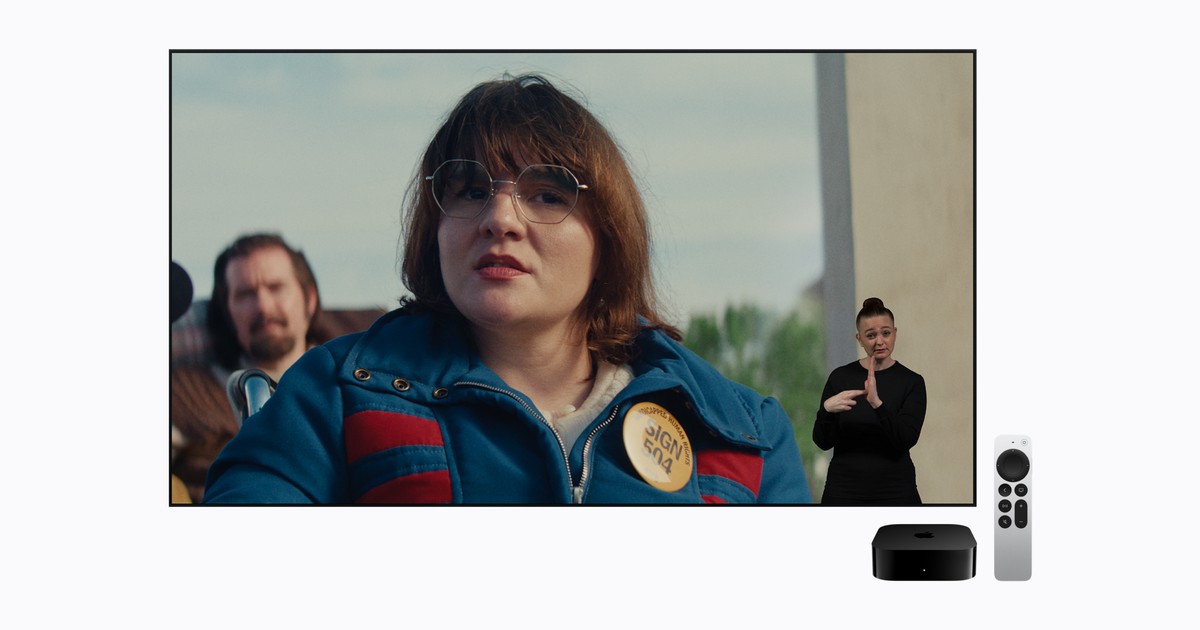
Apple’s new Sign Language interpretation feature integrates a dedicated sign‑language video track into the Apple TV app’s media pipeline, leveraging the existing AVFoundation timed‑metadata infrastructure. When a supported title is selected, the playback session queries the content‑delivery manifest for an auxiliary “sign‑language” rendition, which is delivered as a separate HEVC‑encoded video stream synchronized to the primary audio‑video presentation via a common presentation timestamp (PTS) base. The TVOS media player then composites the sign‑language stream as an overlay using a Core Animation layer positioned according to user‑defined safe‑area constraints, while preserving the original closed‑caption and audio‑description tracks.
From an engineering standpoint, the change introduces a new Media Accessibility subsystem flag (kAVMediaCharacteristicSignLanguage) that propagates through AVAsset, AVPlayerItem, and AVPlayerViewController, enabling automatic track selection when the user enables “Sign Language” in Settings → Accessibility → Subtitles & Captioning. The implementation also adds a fallback path: if the sign‑language rendition is unavailable, the player gracefully degrades to the standard closed‑caption track without interrupting playback. This design avoids modifications to the DRM pipeline, as the sign‑language stream is encrypted under the same FairPlay key hierarchy as the primary video.
| Subsystem / Parameter | Baseline / Previous | Updated Implementation |
|---|---|---|
| Track Selection Logic | Closed‑caption and audio‑description tracks only | Additional kAVMediaCharacteristicSignLanguage track with automatic priority when enabled |
| Compositing Path | Caption rendering via TextOutputLayer | HEVC sign‑language video overlaid via Core Animation layer, synchronized to PTS |
| Manifest Signaling | HLS/DASH manifests list subtitle and audio‑description renditions | Manifest includes a “sign-language” rendition entry with identical encryption keys |
Actionable Diagnostic & Implementation Steps
- Verify manifest inclusion:
curl -I https://content.example.com/manifest.m3u8 | grep -i sign-language– confirm a rendition with TYPE=VIDEO, CHARACTERISTICS=sign-language appears. - Enable the feature on a test device: Settings → Accessibility → Subtitles & Captioning → Sign Language = On; then launch the Apple TV app and play a supported title.
- Validate synchronization: Use Instruments → AVPlayer Timing template to compare PTS of primary video and sign‑language overlay; drift must remain < 40 ms across 30 min playback.
Ecosystem Compatibility & Support Notice
- tvOS 17.2 or later (Apple TV 4K (2nd gen) and Apple TV HD)
- Apple TV app version 12.5+ with Media Accessibility framework 2.3
- Content providers must deliver sign‑language renditions encoded in HEVC Main 10, 30 fps, same DRM key set as primary video
- User‑controlled overlay positioning requires Safe Area API (iOS 16+ / tvOS 16+)
Source and technical reference: Apple Newsroom RSS.
Share your OS version, device model, and exact error code in our independent peer Q&A rooms.